





Hello everyone.
I think I have an issue with the wiring of the close sensors on our gates - we have a pair of gates with FAAC arms and a 455D PCB, with optical closing sensors across the gate posts.
As a result of a long story, I swapped in a brand new 455D board and kept the existing wiring and connectors which I plugged into it, set the same settings as before including setting them to Automatic, and then did the complete Time Learning sequence which worked perfectly (Leaf A open, slow, stop; Leaf B open, slow, stop, close, slow, stop; Leaf A close, slow, stop). I had hoped it would just work...
When removing the original board and unplugging connectors, a couple of the wires from the closing sensor were loosely in connector slots. I assumed they had pulled out so fixed them back in. However I only have the top 2 bars showing - when I press the pedestrian access button the pedestrian leaf opens (light comes on) but it never closes. I understand this implies the closing safety device is active... I changed the Fail Safe option to check, and indeed when I do this the pedestrian leaf doesn't even attempt to open.
I figure either I've messed up the wiring or the sensors are broken - without knowing if I've wired it correctly I can't tell which it is though. I can't understand how this should be wired:
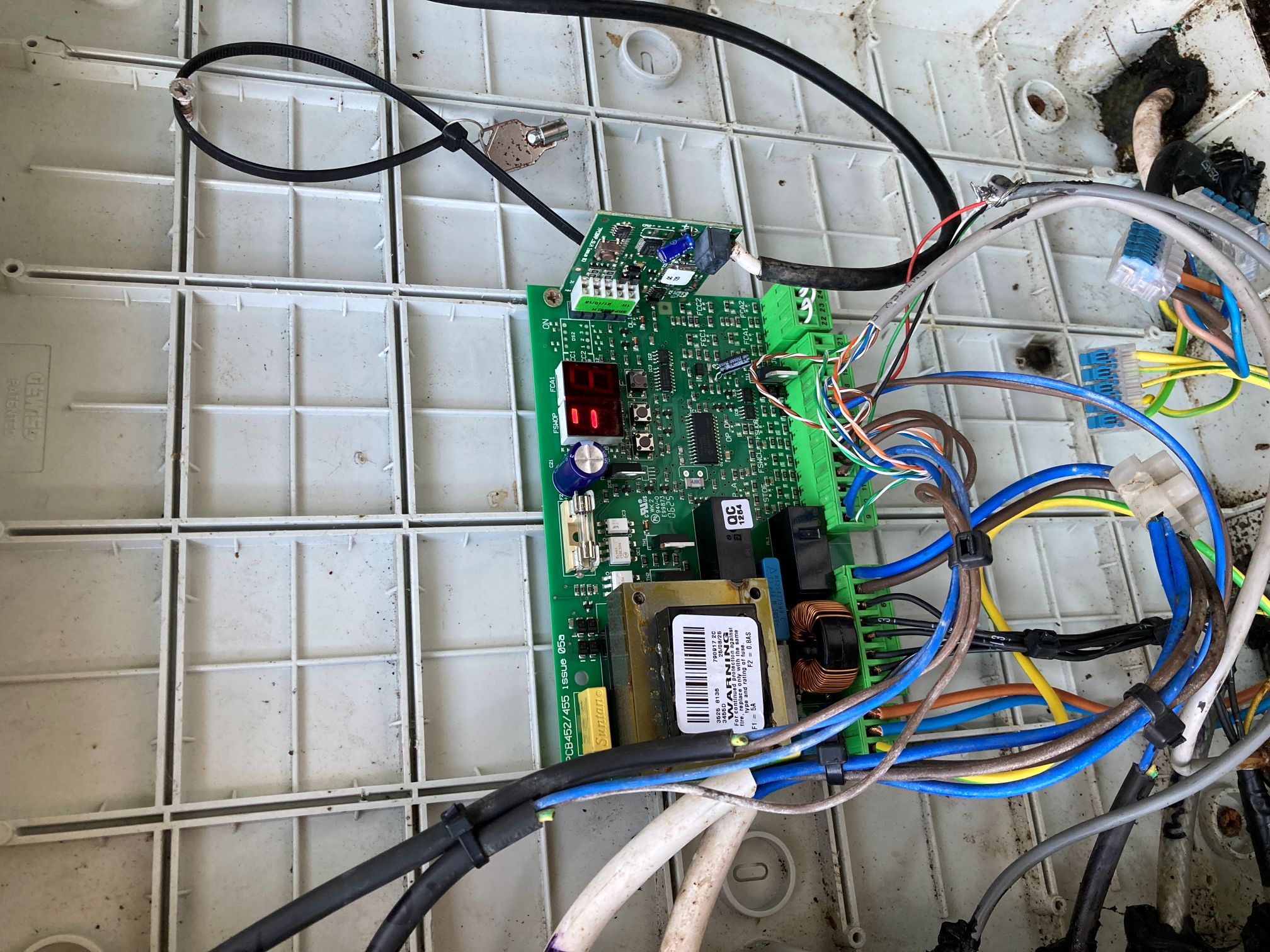
So the closing sensor is the grey wire in the bottom right. I have green going to 12, black and white going to 14, and red going to 17. I have an old photo of the board from a year ago but it's unclear on that whether red and black were wired into 14 and 17 or just "near them". I have tried taking red and black out but it hasn't worked and I know I shouldn't be guessing!
As far as I can tell the other half of the sensor is blue=16 and brown=17 (the cable is underground).
When I read the FAAC manual it doesn't explain anything more than connecting to 12 for closing photocells (I don't understand what the RXCL/TXCL diagrams reference?). I also read it to imply that there should be a wire doing directly from 13 to 19 as there is no opening sensor but there has never been a wire there?
I'm pretty confused, I would really appreciate any help on this please.
Thanks.
I think I have an issue with the wiring of the close sensors on our gates - we have a pair of gates with FAAC arms and a 455D PCB, with optical closing sensors across the gate posts.
As a result of a long story, I swapped in a brand new 455D board and kept the existing wiring and connectors which I plugged into it, set the same settings as before including setting them to Automatic, and then did the complete Time Learning sequence which worked perfectly (Leaf A open, slow, stop; Leaf B open, slow, stop, close, slow, stop; Leaf A close, slow, stop). I had hoped it would just work...
When removing the original board and unplugging connectors, a couple of the wires from the closing sensor were loosely in connector slots. I assumed they had pulled out so fixed them back in. However I only have the top 2 bars showing - when I press the pedestrian access button the pedestrian leaf opens (light comes on) but it never closes. I understand this implies the closing safety device is active... I changed the Fail Safe option to check, and indeed when I do this the pedestrian leaf doesn't even attempt to open.
I figure either I've messed up the wiring or the sensors are broken - without knowing if I've wired it correctly I can't tell which it is though. I can't understand how this should be wired:
So the closing sensor is the grey wire in the bottom right. I have green going to 12, black and white going to 14, and red going to 17. I have an old photo of the board from a year ago but it's unclear on that whether red and black were wired into 14 and 17 or just "near them". I have tried taking red and black out but it hasn't worked and I know I shouldn't be guessing!
As far as I can tell the other half of the sensor is blue=16 and brown=17 (the cable is underground).
When I read the FAAC manual it doesn't explain anything more than connecting to 12 for closing photocells (I don't understand what the RXCL/TXCL diagrams reference?). I also read it to imply that there should be a wire doing directly from 13 to 19 as there is no opening sensor but there has never been a wire there?
I'm pretty confused, I would really appreciate any help on this please.
Thanks.